Camera on the Home Network
Some cameras support Camera On the Home Network (COHN). This capability allows the client to perform command and control with the camera indirectly through an access point such as a router at home. For security purposes, all communications are performed over HTTPS.
Certificates
Secure communication with the camera over HTTPS requires two things: a trusted SSL/TLS certificate and Basic auth username/password used in the HTTPS header.
A provisioned camera has two certificates:
- A Root CA cert provided to the client, which has a 1 year lifespan
- A Camera cert, which contains the camera's current IP address on the local network and is signed by the Root CA cert
This use of a certificate chain allows the camera's IP address to change (e.g. when DHCP lease expires or when access point is reset/replaced) without the client needing to download and install/trust a new certificate.
Verifying Certificate
The camera acts as the Root Certificate Authority in creating the COHN certificate (Root CA cert). Clients can verify that the certificate is valid using utilities such as openssl:
$ openssl verify -CAfile '/path/to/GoProRootCA.crt' '/path/to/GoProRootCA.crt'
GoProRootCA.crt: OK
View Certificate Details
Most operating systems have utilities to view details about a SSL/TLS certificate:
- MacOS: Right-mouse-click >> Quick Look
- Windows: Right-mouse-click >> Properties
- Ubuntu: Right-mouse-click >> Open with View File
- OpenSSL: openssl x509 -in /path/to/GoProRootCA.crt -noout -text
Provisioning Procedure
In order to use the COHN capability, the camera must first be provisioned for COHN. At a high level, the provisioning process is as follows:
- Connect the camera to an access point
- Instruct the GoPro to Loading...
- Use Loading... to get the created COHN certificate
- Use Loading... to get the Basic auth credentials
Depending on the use case, some of these steps can also be performed via Loading....
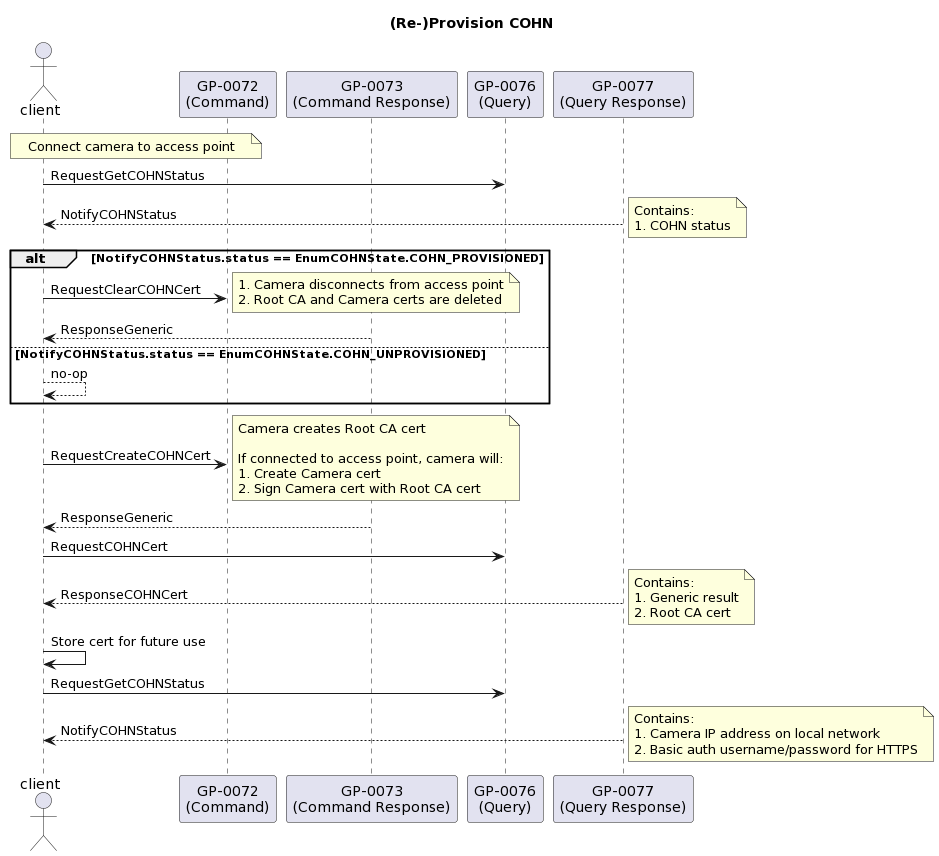
Once the camera is provisioned, the client can communicate with the camera via HTTPS. The camera supports nearly all functionality over HTTPS that it does over HTTP. For more details about HTTP/HTTPS, see the BOSS Internal HTTP specification.
The camera will remember and apply the COHN configuration on future boots so it is not necessary to reprovision on future connections.
Operations
Clear COHN Certificate
Clear the COHN certificate.
Loading...Loading...Create COHN Certificate
Create the COHN certificate.
Loading...Loading...Get COHN Certificate
Get the COHN certificate.
Loading...Loading...Get COHN Status
Get the COHN status including connection information and credentials.
Loading...Loading...Loading...Set COHN Setting
Set COHN settings.
Loading...Loading...