Live Streaming
The camera supports the ability to stream to social media platforms such as Twitch, YouTube, Facebook or any other site that accepts RTMP(S) URLs.
The livestream is transferred via RTMP as AVC/h264. For additional details about getting started with RTMP, see How to Stream.
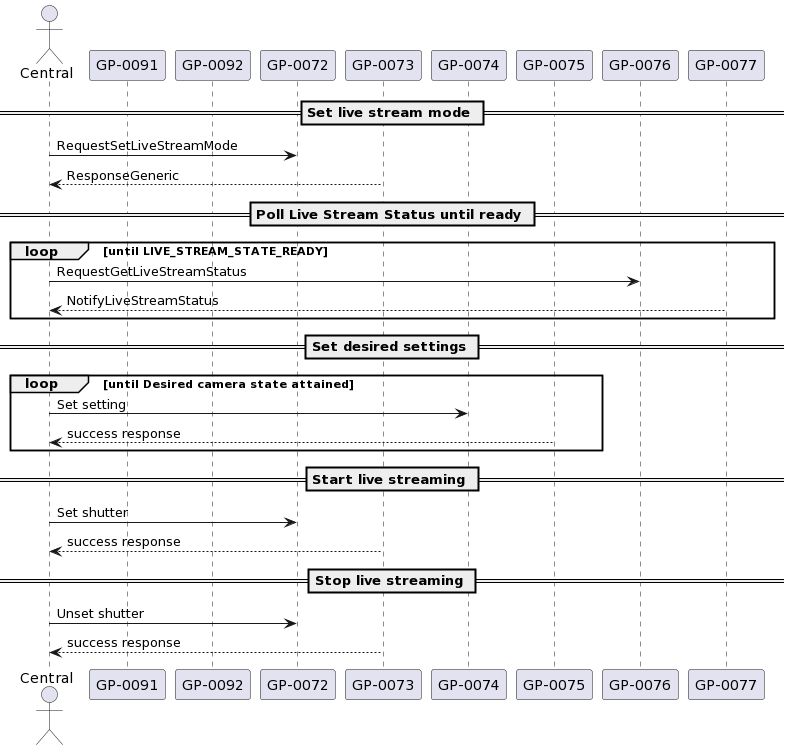
Live streaming with camera is accomplished as follows:
- Put the camera into Station Mode and connect it to an access point
- Use Set Livestream Mode to configure livestreaming.
- Poll for Livestream Status until the camera indicates it is ready
- Set the shutter to begin live streaming
- Unset the shutter to stop live streaming
Metadata
The following fields are reported as RTMP Metadata:
| Field | Type | Description |
|---|---|---|
| creator | string | "GoPro Hero" |
| encoder | string | Serial Number (e.g. "C35313DVT1X220") |
| width | number | stream resolution width |
| height | number | stream resolution height |
| videodatarate | number | stream bitrate |
| framerate | number | stream framerate |
| videocodecid | number | 7 |
| audiocodecid | number | 10 |
| audiodatarate | number | audio bitrate |
| audiosamplerate | number | audio sample rate |
| audiosamplesize | number | 16 |
| stereo | boolean | True if audio has 2 channels, False otherwise |
| filesize | number | size of the file |
Operations
Get Livestream Status
Loading...Loading...Loading...
Set Livestream Mode
note
The current Livestream Mode can be queried via Get Livestream Status.