Control
This page details operations to command and control the GoPro.
Operations
Clear New Media Flag
Clear the new media flag on the camera.
Loading...Loading...Delete All Files
Delete all files from the SD card by formatting it.
Request (UUID: Command)
Response (UUID: Command Response)
Delete Last File
Delete the last captured media item from the camera.
Request (UUID: Command)
Response (UUID: Command Response)
Keep Alive
In order to maximize battery life, GoPro cameras automatically go to sleep after some time. This logic is handled by a combination of the Loading... setting which most (but not all) cameras support and a Keep Alive message that the user can regularly send to the camera. The camera will automatically go to sleep if both timers reach zero.
The Auto Power Down timer is reset when the user taps the LCD screen, presses a button on the camera, programmatically (un)sets the shutter, sets a setting, or loads a Preset.
The Keep Alive timer is reset when the user sends a keep alive message.
The best practice to prevent the camera from inadvertently going to sleep is to start sending Keep Alive messages every 3.0 seconds after a connection is established.
Request (UUID: Setting)
Parameters:
keep_alive(uint8): hard-coded data set to 0x42
Response (UUID: Settings Response)
Load Legacy Mode
Load a legacy mode value.
Request (UUID: Command)
Parameters:
mode(uint8): mode identifier
Response (UUID: Command Response)
Locate Camera
Enable or disable the camera locate beeper.
Request (UUID: Command)
Parameters:
enable(uint8): 1 to enable locate, 0 to disable it
Response (UUID: Command Response)
Press Button
Simulates pressing a physical button on the camera. The resulting operation matches exactly what happens when the corresponding button is physically pressed.
Request (UUID: Command)
Parameters:
button_id(uint8): Button to press (0 = shutter, 1 = mode)press_type(uint8): Type of button press (0 = short press, 1 = long press)
Response (UUID: Command Response)
Reboot the Camera
Reboot the camera, approximating a battery pull.
Request (UUID: Command)
Response (UUID: Command Response)
Reset Multishot Protune
Reset multishot Protune settings to their defaults.
Request (UUID: Command)
Parameters:
value_length(uint8): always 1value(uint8): always 1
Response (UUID: Command Response)
Reset Onscreen Shortcuts
Reset onscreen shortcuts to their default configuration.
Loading...Loading...Reset Photo Protune
Reset photo Protune settings to their defaults.
Request (UUID: Command)
Parameters:
value_length(uint8): always 1value(uint8): always 1
Response (UUID: Command Response)
Reset Protune
Reset Video Protune
Reset video Protune settings to their defaults.
Request (UUID: Command)
Parameters:
value_length(uint8): always 1value(uint8): always 1
Response (UUID: Command Response)
Set Analytics
Configure the client as third-party for analytic tracking.
Request (UUID: Command)
Response (UUID: Command Response)
Set App Power-On Start
Notify the camera that it was woken by a non-mobile-offload app interaction.
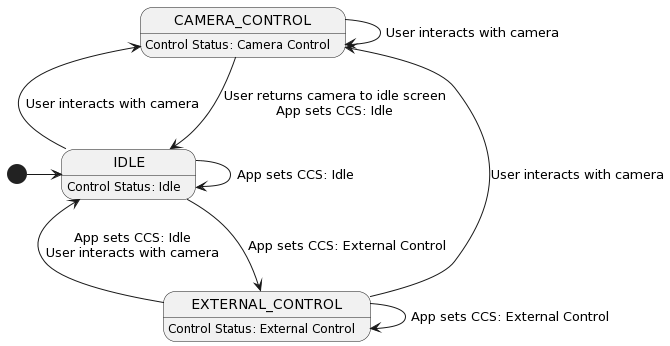
Loading...Loading...Set Camera Control
Request camera control status to manage external control.
Set Camera Name
Set the camera's name.
Loading...Loading...Set Client Device Type
Allows mobile applications and accessories to specify their device type to the camera. This information is used by the camera for additional pairing context and analytics tracking.
Request (UUID: Command)
Parameters:
reserved(uint8): 0device_type(uint8): Device type - 1 for IOS, 2 for ANDROIDreserved(uint8): 0reserved(uint8): 0reserved(uint8): 0reserved(uint8): 0
Response (UUID: Command Response)
Set Date Time
Set the camera's date and time (without timezone and daylight-savings information).
The date_time parameter is a 7 byte value defined as such:
- uint16 year
- uint8 month (1-12)
- uint8 day (1-31)
- uint8 hour (0-23)
- uint8 minute (0-59)
- uint8 second (0-59)
For example, date time "2023-01-31 03:04:05" is serialized as 07:e7:01:1f:03:04:05
Request (UUID: Command)
Parameters:
date_time(7 byte date_time defined above): Date time to set
Response (UUID: Command Response)
Set In Contextual Menu
Tell the camera whether the connected client is in a contextual menu.
Loading...Loading...Set Local Date Time
Set the camera's date and time with timezone and daylight-savings information.
The date_time parameter is a 10 byte value defined as such:
- uint16 year
- uint8 month (1-12)
- uint8 day (1-31)
- uint8 hour (0-23)
- uint8 minute (0-59)
- uint8 second (0-59)
- int16 UTC offset in minutes
- uint8 is_dst (1 if daylight savings time is enabled, 0 otherwise)
For example, date time "2023-01-31 03:04:05 (utc-02:00) (dst: on)" is serialized as 07:E7:01:1F:03:04:05:FF:88:01
Request (UUID: Command)
Parameters:
date_time(10 byte date_time defined above): Date time to set
Response (UUID: Command Response)
Set Mobile Offload Power-On Start
Notify the camera that it was woken to perform mobile offload work.
Loading...Loading...Set Mobile Offload Stop
Notify the camera that the mobile offload flow should stop.
Loading...Loading...Set Mode
Load a preset group or flatmode by ID.
Request (UUID: Command)
Parameters:
mode(uint16): preset-group or flatmode identifier
Response (UUID: Command Response)
Set Pairing State
This should be used to finish the initial pairing process in order to clear the pairing screen on the camera UI.
Loading...Loading...Set Shutter
Set Shutter On / Off to start/stop encoding or take a photo.
Request (UUID: Command)
Parameters:
mode(uint8): 0 for off, 1 for on
Response (UUID: Command Response)
Set Submode
Change the active submode within the selected primary mode.
Examples include Looping within Video mode, Night within Photo mode, and Time Lapse Video within Multishot mode.
Request (UUID: Command)
Parameters:
mode_length(uint8): always 1mode(uint8): primary mode identifiersubmode_length(uint8): always 1submode(uint8): submode identifier within the selected primary mode
Response (UUID: Command Response)
Set TimeWarp Speed 1x
Enable or disable realtime TimeWarp 1x while the camera is encoding in TimeWarp mode.
Loading...Loading...Set TimeWarp Speed Ramp
Set the TimeWarp speed-ramp option.
Loading...Loading...Set TimeWarp Speed Ramp Active
Enable or disable TimeWarp speed ramping.
Loading...Loading...Set Turbo Transfer
Enable or disable turbo transfer mode for faster media downloads.
Loading...Loading...Set Wakeup Reason
Set the wakeup reason for the camera.
Loading...Loading...Sleep
Put the camera to sleep.
The camera is still connectable via BLE in sleep.
Request (UUID: Command)
Response (UUID: Command Response)